Cisco ASA
Cisco ASA Log Forwarding Configuration
To configure log forwarding from Cisco ASA, you can use either the CLI or the ASDM graphical interface. Follow the official Cisco documentation linked below for step-by-step setup instructions.
-
Configure via CLI (SSH/Console)
When configuring syslog via CLI, ensure the EMBLEM format is not enabled. Enabling EMBLEM format changes the syslog message structure in a way that is not supported by Scope.
-
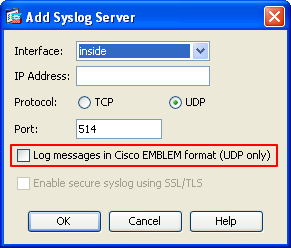
When configuring syslog via ASDM, in the Add Syslog Server dialog, ensure the Log messages in Cisco EMBLEM format (UDP only) option is not checked. Leaving this option unchecked ensures logs are forwarded in the standard syslog format required by Scope.
Supported Log Formats
The Scope application supports ingestion of Cisco ASA logs in the Syslog format.
Sample logs
<166>Apr 17 2020 14:08:08 HOST_OR_IP: %ASA-6-302016: Teardown UDP connection 110577675 for Outside:10.123.123.123/53723 to Inside:10.233.123.123/53