Check Point Firewall
Check Point Firewall Log Forwarding Configuration
To configure log forwarding from Check Point Firewall to Scope, use the native Log Exporter feature available in SmartConsole. Follow the official documentation below for step-by-step setup instructions.
-
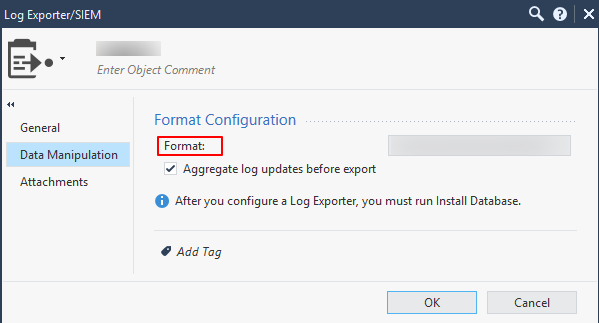
During setup, in the Data Manipulation screen, ensure you set the Format field to JSON. This is required for Scope to correctly parse and ingest the forwarded logs.
Supported Log Formats
The Scope application supports ingestion of Check Point Firewall logs in the JSON format.
Sample logs
{"h_version":5,"h_alert":"Undefined","action":"Reject","conn_direction":"Outgoing","contextnum":1,"flags":7140352,"ifdir":"outbound","ifname":"eth2","logid":0,"loguid":"0x51d56ebd,0x1d4fc5b,0x569ef7a1,0x9572d6a3","origin":"10.168.7.225","originsicname":"CN=redact,O=redact.redact.conn.eol.redact","sequencenum":27,"time":1717517992,"__policy_id_tag":"product=VPN-1 & FireWall-1[db_tag={CA23EB9D-A358-6E41-8821-DFFD4E40C4BE};mgmt=redact;date=1717510794;policy_name=RunningFWConfig_W2]","context_num":1,"dst":"10.240.241.175","hll_key":10542610163595972868,"lastupdatetime":1717517992,"message_info":"Not allowed SSL version","nat_addtnl_rulenum":0,"nat_rule_uid":"de7813c1-5e18-4c89-b3e1-5e41f92c57a5","nat_rulenum":1,"product":"VPN-1 & FireWall-1","proto":6,"protocol":"Unknown Protocol","s_port":55136,"service":5222,"service_id":"ssl_v3-Protocol-Signature","sig_id":7,"src":"10.120.24.116","xlatedport":0,"xlatedst":"0.0.0.0","xlatesport":26895,"xlatesrc":"10.226.1.75","parent_rule_._._match_table":[0,0],"match_id_._._match_table":[314,16777252],"rule_action_._._match_table":["Accept","Accept"],"rule_name_._._match_table":["redact services","Implicit Allow"],"rule_uid_._._match_table":["53ddf3b3-0a24-4fe9-8c3c-fabbc63ea05e","a234db52-b428-4aed-a65c-f9d3037ec3cb"],"layer_name_._._match_table":["RunningFWConfig_W2 Security","RunningFWConfig_W2 Application"],"layer_uuid_._._match_table":["ac9d24a3-80a9-48c2-b1a5-4f37939e7c5a","b644a029-8091-421a-88a1-612d4f47ab46"]}